
VSAM Short Notes
Access Methods are software units that control the data transfer between main memory (primary storage) and secondary storage devices. Secondary or auxiliary storage devices are independent of computer memory — for example - tape or disk.
Access Method Types -
- BSAM - is the short form of the Basic Sequential Access Method. It arranges records sequentially in the order of how they are entered from sequential (Example - tapes) or direct access devices (Example - disks). DSORG=PS in DCB specifies the declared dataset using BSAM (if the z/OS version is <= 1.7).
- QSAM - is the short form of Queued Sequential Access Method and is the extended method of the BSAM. It reads the records into storage before they are requested to improve the performance. This technique is called as queued access. DSORG=PS in DCB specifies the declared dataset uses QSAM (if the z/OS version is > 1.7).
- BDAM - is the short form of the Basic Direct Access Method. It organizes the records in any sequence based on the requirement and retrieves records by actual or relative address. DSORG=DA in DCB specifies the declared dataset uses BDAM.
- BPAM - is the short form of the Basic Partitioned Access Method. It organizes the records as members of a partitioned dataset (PDS) or a partitioned dataset extended (PDSE) on DASD. DSORG=PO in DCB specifies the declared dataset uses BPAM.
- VSAM - is the short form of the Virtual Storage Access Method. It is an IBM-invented access method that allows us to access and organize the records in the disk dataset.
VSAM is the short form of Virtual Storage Access Method. It is a file storage method used to store and access data efficiently. It is mainly used to handle large volumes of data with fast retrieval using keys or indexes. IDCAMS utility used to define the VSAM datasets.
VSAM Dataset Types -
Based on the VSAM storage format, accessing, and organizing the records, the datasets are classified into four different types, and those are -
- Entry-Sequenced Data Sets (ESDS)
- Key-Sequenced Data Sets (KSDS)
- Relative Record Data Sets (RRDS)
- Linear Data Sets (LDS)
VSAM provides a functional equivalent datasets for most of the existing dataset types as follows -
- ESDS is the functional equivalent of Physical Sequential organization (PS file).
- KSDS is the functional equivalent of Indexed Sequential organization (IS file).
- RRDS is the functional equivalent of Direct Access organization (DA).
| Feature | VSAM Files | Non-VSAM Files |
|---|---|---|
| Definition | Advanced dataset and access method | Traditional datasets like PS, PDS, etc. |
| Access Method | Uses VSAM access method | Uses QSAM, BSAM, etc. |
| Data Organization | Indexed, Sequential, Direct (KSDS, ESDS, RRDS) | Mostly sequential or partitioned |
| Access Type | Supports key-based, direct, and sequential access | Mostly supports sequential access |
| Performance | Faster for large files and frequent updates | Slower for random or frequent data access |
| Storage | Works only on disk (DASD) | Can be on disk or tape |
| Editing | Not directly editable in ISPF | Easily editable in ISPF |
| Flexibility | More flexible and suitable for dynamic data | Less flexible and suitable for simple file needs |
| Feature | VSAM | DB2 |
|---|---|---|
| Type | File storage method | Relational database |
| Data Structure | Record-based (files) | Table-based (rows and columns) |
| Access Method | Program-driven (COBOL, etc.) | SQL-based access |
| Data Relationships | No built-in relationships | Supports relationships (keys, joins) |
| Flexibility | Less flexible for complex queries | Highly flexible for complex queries |
| Performance | Very fast for simple, high-volume transactions | Optimized for complex queries and reporting |
| Data Integrity | Limited (handled by programs) | Strong (constraints, keys, ACID support) |
| Usage | Used for batch and transaction processing | Used for enterprise databases and reporting |
Cluster -
A VSAM cluster is a logical definition for a VSAM dataset and has the below one or two components -
- The data component contains the data records.
- The index component of the key-sequenced cluster consists of the index records.
For example - Assume MATEGJ.TEST.VSAM is the VSAM KSDS file created.
MATEGJ.TEST.VSAM			-	Cluster Component
MATEGJ.TEST.VSAM.DATA		-	Data Component
MATEGJ.TEST.VSAM.INDEX		-	Index Component
Logical record -
A logical record is a logical representation of a record used to populate the data to VSAM or map the data while retrieving it from VSAM. The application programmer designs the logical records and it is a set of fields (that includes key fields) with logical descriptions. A logical record can be of a fixed-length or a variable-length.
For Example - A VSAM KSDS file with 47 bytes length logical record defintion as follows -
DATA DIVISION.
FILE SECTION.
FD KSDS-1.
	RECORD CONTAINS 47 CHARACTERS.
	BLOCK CONTAINS 470 CHARACTERS.
	DATA RECORD is KSDS-RECORD-1.
	RECORDING MODE IS F.

01 KSDS-RECORD-1.
	05 KSDS-KEY    	PIC X(03).
	05 KSDS-DATA   	PIC X(44).
In the above example, KSDS-RECORD-1 is the logical record used to process the physical VSAM file.
Physical record -
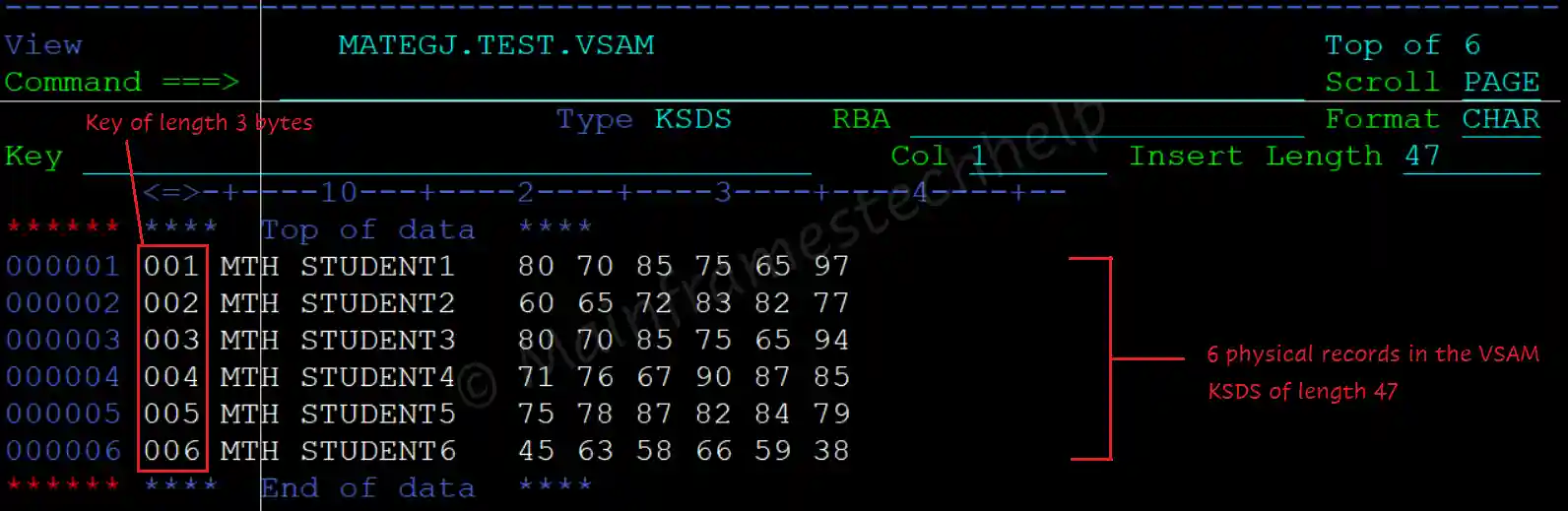
A physical record is an actual record that is stored on the disk allocated for the file. It may be a set of one or more logical records.
For example -
Control Interval -
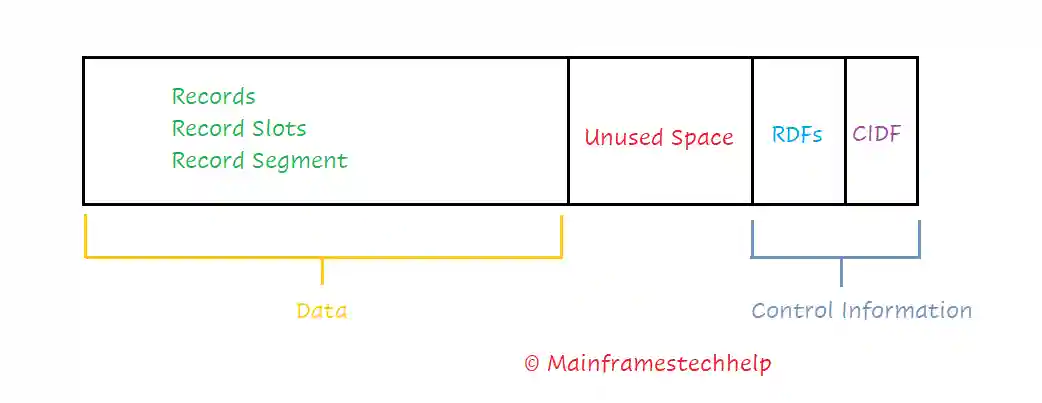
Control interval (CI) is the contiguous memory area of DASD (Direct Access Storage Device) used to store the physical records and control information about the records. The CI size can be from 512 bytes to 32 KB. Small CI is suitable for random access and large CI is suitable for sequential access.
Control Area -
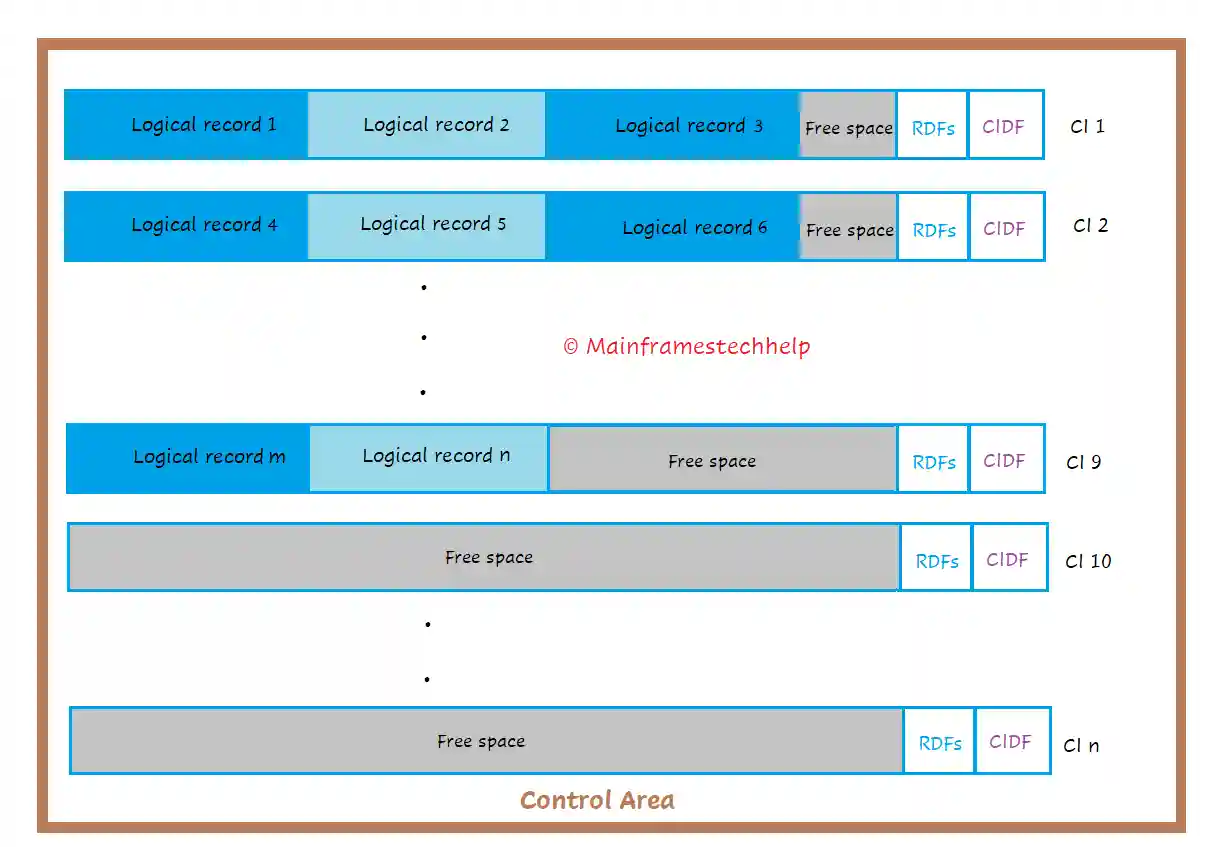
Control Area (CA) is a fixed-length contiguous memory area of DASD formed by two or more Control Intervals (CIs). CA's maximum size is one cylinder, and the minimum size is one track. The CA size is defined during the dataset definition. VSAM datasets are always extended in the units of CAs (i.e., multiples of CAs).
Spanned Records -
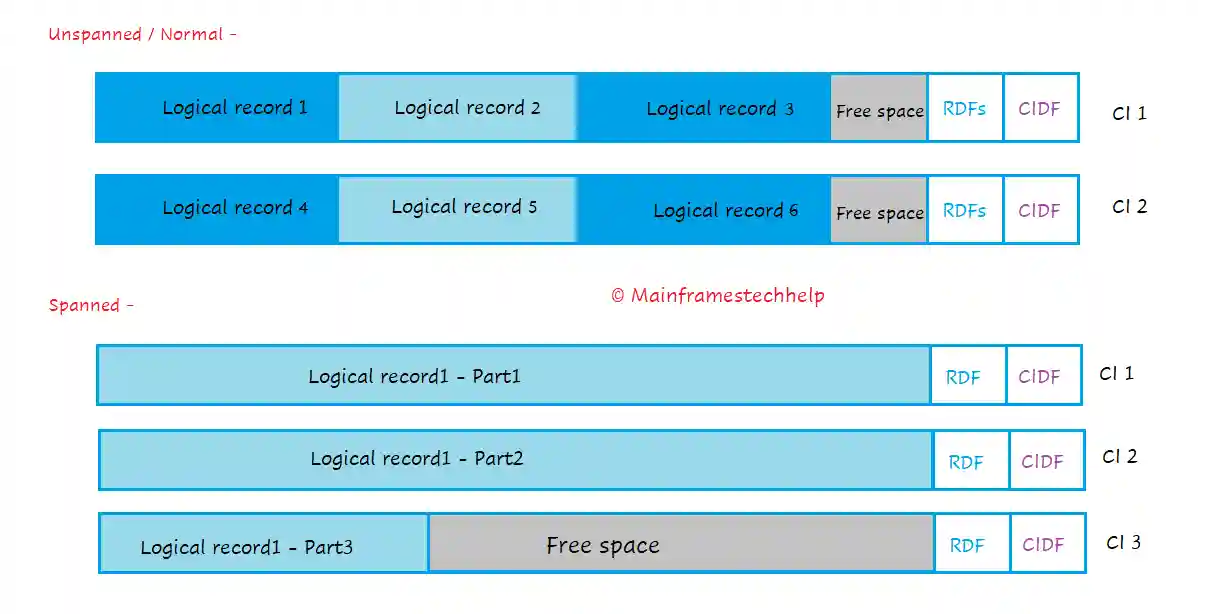
Spanned records are larger logical records than the CI size. DEFINE CLUSTER should use SPANNED attribute to have spanned records when defining the dataset. Spanned records can store on multiple control intervals (CIs).
Alternate Indexes -
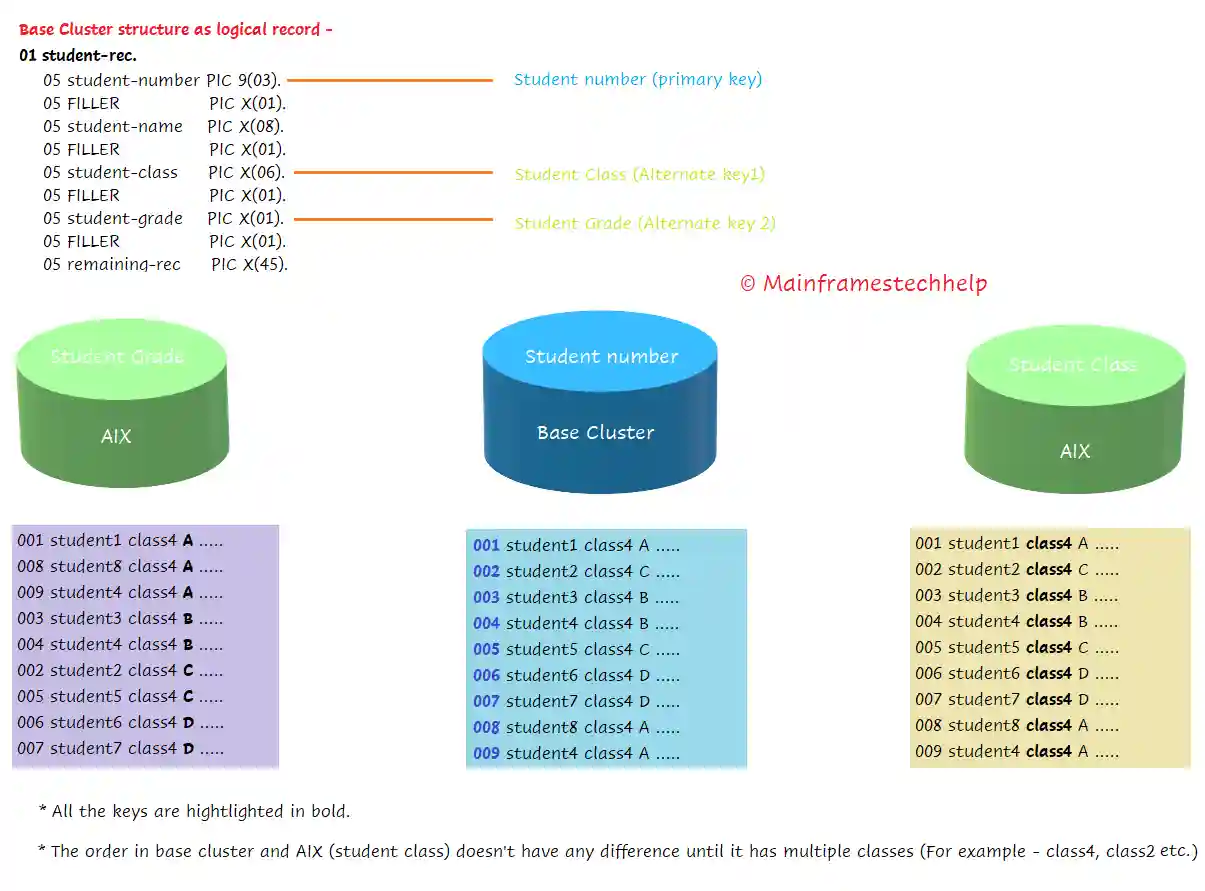
Alternate indexes (AIXs) allow access to the logical records sequentially or directly using alternate key fields (other than the primary key field). Each alternate index is a KSDS cluster with an index and data components. The AIX data component contains a set of primary keys that are associated with the alternate key. IDCAMS utility is used to define AIX.
For example -
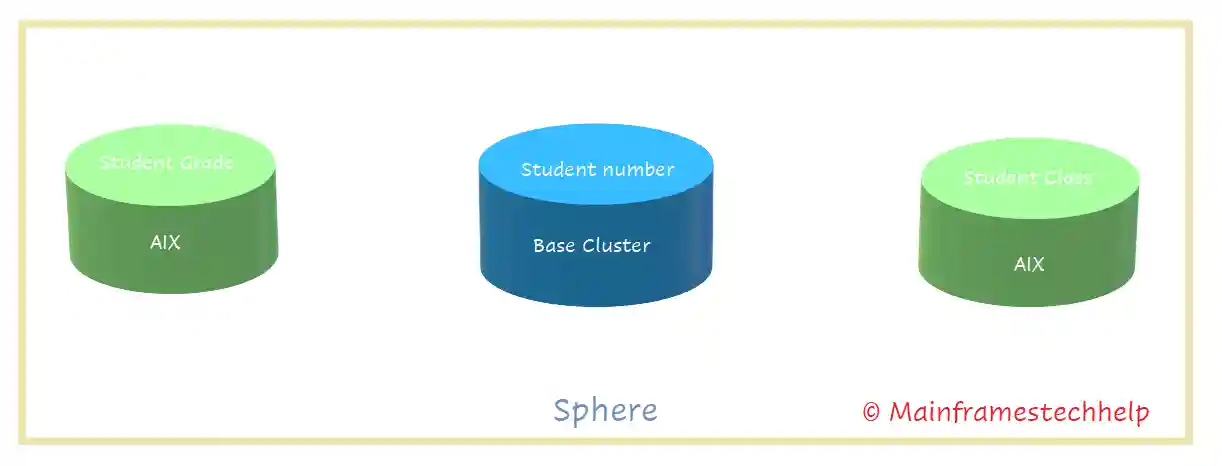
Sphere -
A sphere is a group of base clusters and their associated clusters (AIX).
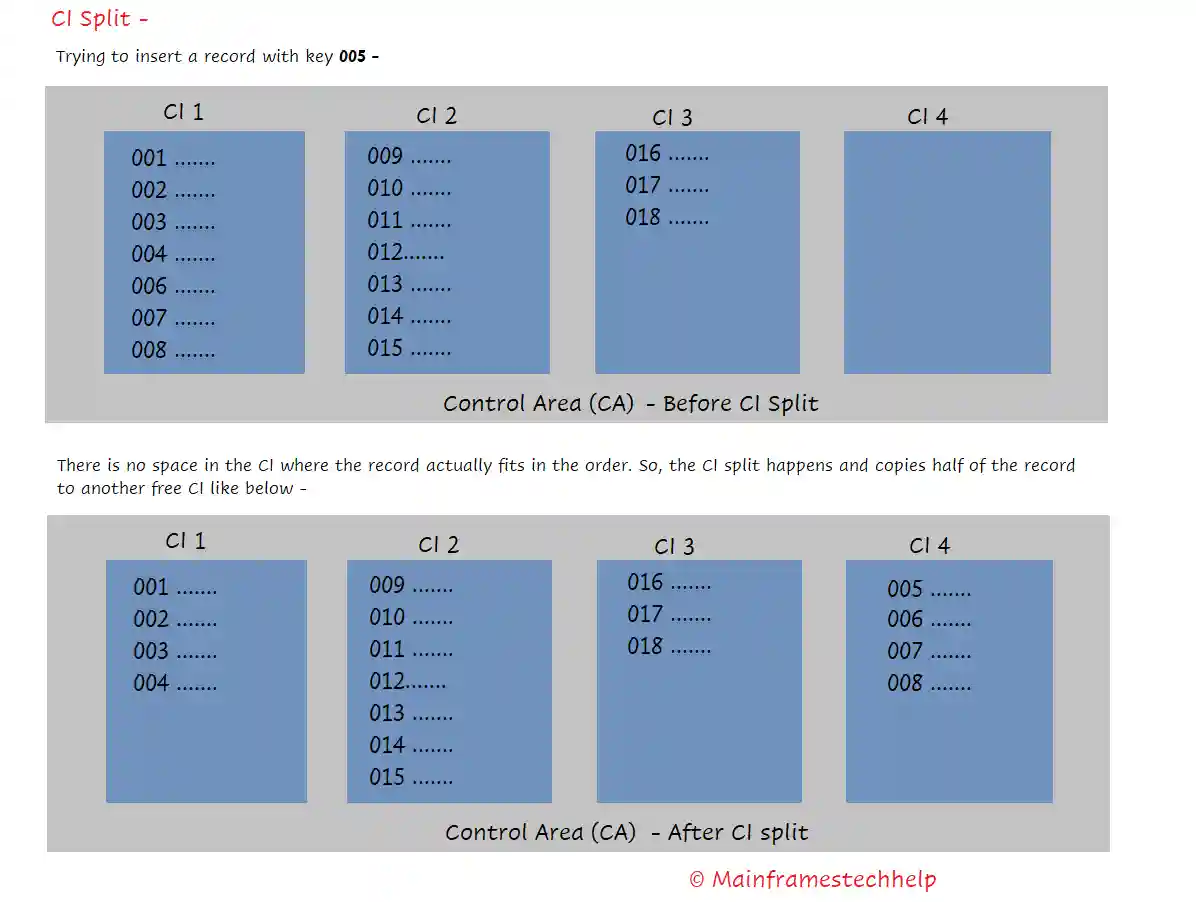
Splits -
CI split occurs when there is not enough space to process the below two requests -
- Inserting a new record at the end of CI.
- An existing record length expanded.
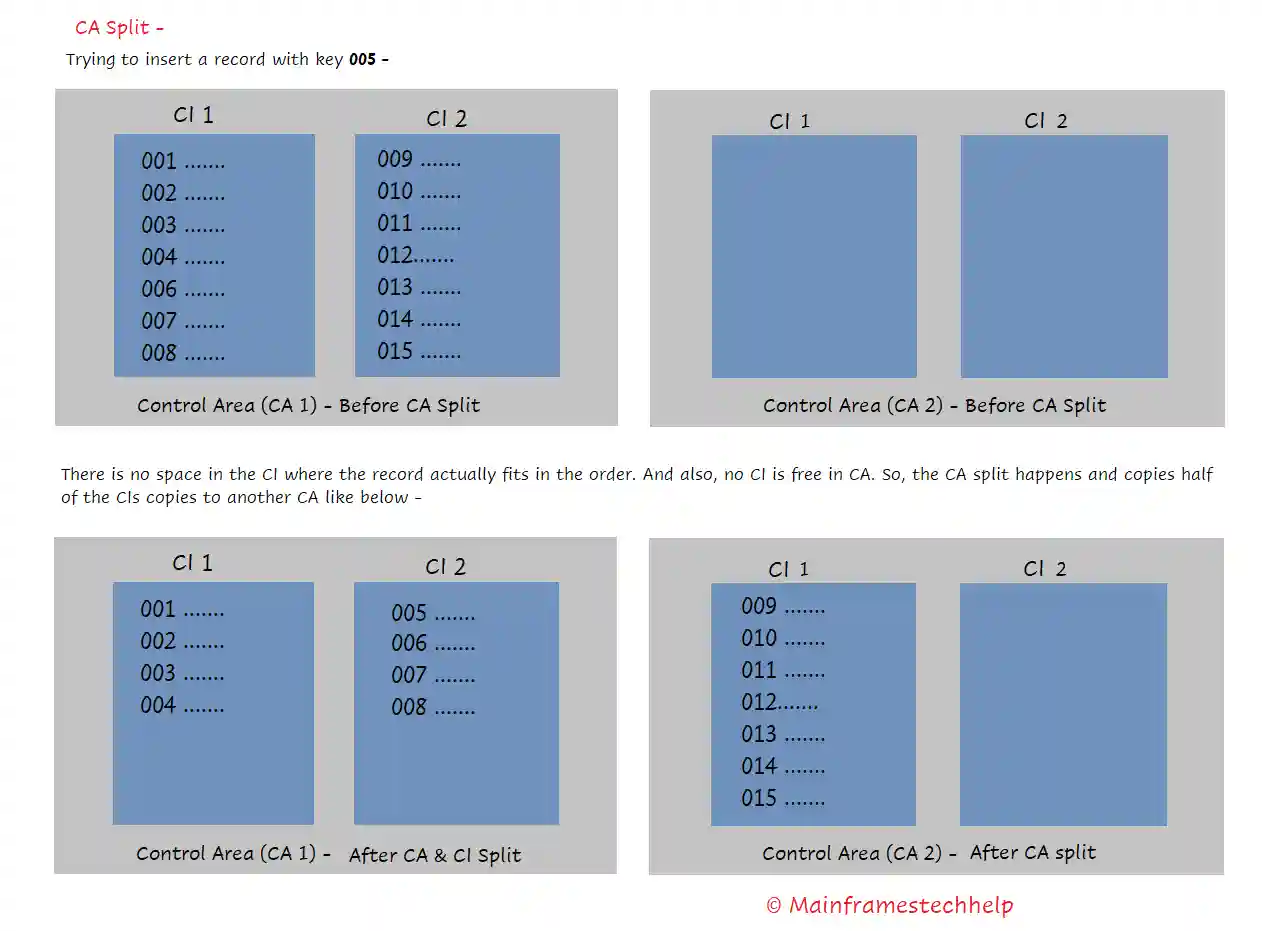
Similarly, if there is not enough space in all the CIs of a CA, then CA is split occurs. Approximately half of the CIs of fully loaded CA data move to the other free CIs of different CA.
A component is an individual part of a VSAM dataset. Each component has an entry, a name in the catalog, and an entry in the VTOC. VSAM dataset has three components, and those are -
- A cluster is a logical definition for a VSAM dataset and has the below one or two components -
- The data component contains the data records.
- The index component of the key-sequenced cluster consists of the index records.
For example - Assume MATEGJ.TEST.VSAM is the VSAM KSDS file created.
MATEGJ.TEST.VSAM			-	Cluster Component
MATEGJ.TEST.VSAM.DATA		-	Data Component
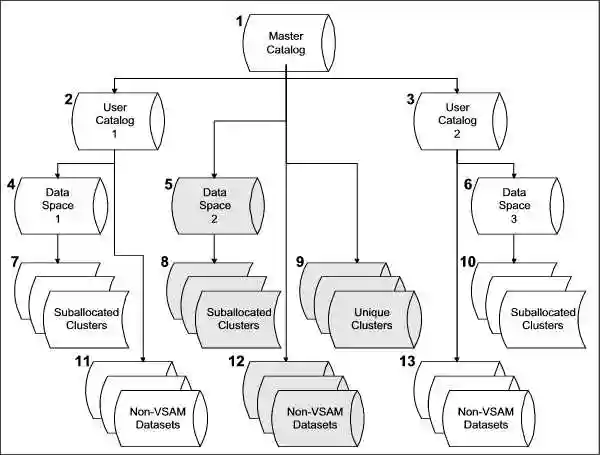
MATEGJ.TEST.VSAM.INDEX - Index ComponentThe below diagram shows the catalog structure and its components -
Catalog -
Catalog maintains the dataset information like unit and volumes on which the dataset is located. It uses the same information while retrieving the data from the dataset.
All Catalogs are classified into two types, and those are -
- Master Catalog
- User Catalogs
Master Catalog -
The Master Catalog stores only the dataset high-level qualifier with the name of the user catalog, which has the location of all the datasets information. Every mainframe (z/OS) system that uses VSAM has at least one master catalog.
For example -
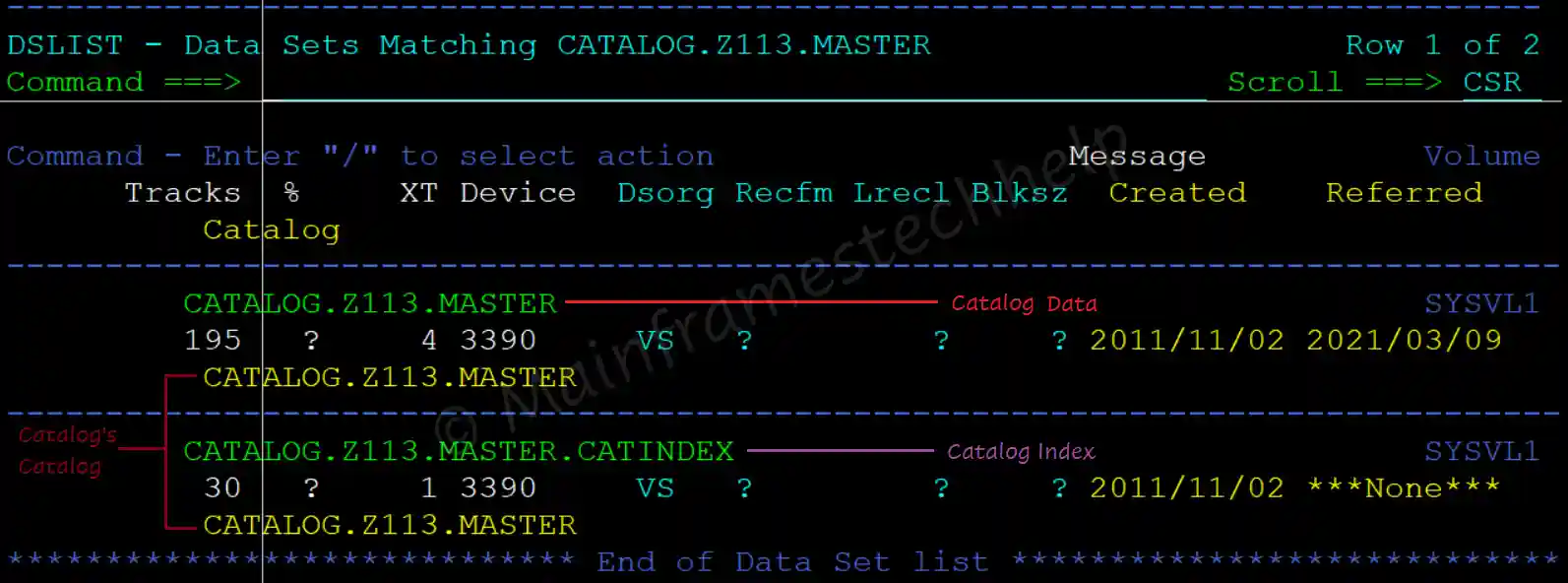
In the above example, CATALOG.Z113.MASTER is a catalog, storing in a catalog CATALOG.Z113.MASTER and it is Master Catalog.
User Catalog -
A User Catalog is a catalog that contains the name and location of a dataset (DSN / VOLUME / UNIT). The user catalog contains the application-specific datasets information (entries).
For example -
Let us assume CATALOG.Z113.USERCTLG is a catalog stored in CATALOG.Z113.MASTER, then CATALOG.Z113.USERCTLG is user catalog.
VSAM Data Space -
Data Space is up to two GB of contiguous virtual storage memory that a program can directly control through assembler instructions. The catalog owns the data space once it links to the VSAM dataset.
Unique Clusters -
A Cluster should be unique in association with the index and data components of the dataset. Every VSAM file type (ESDS, KSDS, RRDS, LDS) has a cluster (base) component and a data component. The cluster name must be different from the data component.
Non-VSAM Datasets -
Non-VSAM datasets (stored on both tape and disk) may have entries in the master catalog and user catalogs.
IDCAMS(Integrated Data Cluster Access Method Services) is the utility program name for access method services (AMS) and used to create the VSAM datasets. The functions of AMS are performed through the different functional commands of IDCAMS.
IDCAMS utility can be invoked in the following three ways -
- Call from the Application program
- Batch mode
- With TSO commands.
ESDS (Entry Sequential Data Set) is a type of VSAM file where records are stored in the order they are inserted. It does not use any key or index, so data is simply appended at the end of the file. Each record is identified by its Relative Byte Address (RBA).
Access Types -
ESDS allows two types of access -
- Sequential access.
- Direct (or random) access with RBA value.
Managing Record?
- We can't delete the existing records and can't alter the record length also.
- If someone says deletion is possible, then it is logical delete (over writing with SPACES).
- However, updating the record is possible when there is no length change or change in record position.
IDCAMS DEFINE CLUSTER command with NONINDEXED parameter is used to create ESDS dataset. INDEX component is ignored because ESDS doesn't have an index component.
Scenario - Create ESDS with fixed-length records of size 47 bytes.
----+----1----+----2----+----3----+----4----+----5----+
...
//STEP01   EXEC PGM=IDCAMS
//SYSIN    DD  *
  DEFINE CLUSTER(NAME(MATEGJ.TEST.ESDS)  -
     RECORDSIZE(47,47)    -
     CYLINDERS(2,1)       -
     CISZ(4096)           -
     VOLUMES(DEVHD4)      -
     NONINDEXED           -
     REUSE     )          -
  DATA(NAME(MATEGJ.TEST.ESDS.DATA))
/*
...
Refer IDCAMS DEFINE command for full set of parameters.
KSDS (Key Sequential Data Set) is a type of VSAM file where records are stored and accessed using a key field. A key identifies each record uniquely, and a key is a field in a predefined position within the logical record.
Access Types -
KSDS allows three types of access -
- Sequential access - retrieving (reading) or inserting (writing) the records sequentially.
- Random (Direct) Access -retrieving the records directly by using key values.
- Dynamic Access - is a combination of sequential and random access.
Managing Record?
- If a record is newly inserted, then the records after the newly inserted record will be reorganized to maintain the logical order for easy retrieval.
- If any record gets deleted, the records after the deleted one will be reorganized to maintain the logical order for easy retrieval.
- If any record is updated, there will be no change in positions.
IDCAMS DEFINE CLUSTER command with INDEXED parameters used to create KSDS dataset.
Scenario - Creating KSDS with fixed-length records of size 47 bytes.
----+----1----+----2----+----3----+----4----+----5----+
...
//STEP01   EXEC PGM=IDCAMS
//SYSIN    DD  *
  DEFINE CLUSTER(NAME(MATEGJ.TEST.KSDS)  -
    RECORDSIZE(47,47)    -
    CYLINDERS(2,1)       -
    FREESPACE(10,20)     -
    KEYS(3,0)            -
    CISZ(4096)           -
    VOLUMES(DEVHD4)      -
    INDEXED              -
    REUSE  )             -
  INDEX(NAME(MATEGJ.TEST.KSDS.INDEX)) -
  DATA(NAME(MATEGJ.TEST.KSDS.DATA))
/*
...RRDS (Relative Record Data Set) is a type of VSAM file where each record is stored in a fixed position and identified by a relative record number (RRN). Each record is identified by its Relative Byte Address (RBA). Inserting a new record always appends immediately after the last record in the ESDS dataset.
Access Types -
KSDS allows three types of access -
- Sequential access - retrieving (reading) or inserting (writing) the records sequentially.
- Random (Direct) Access -retrieving the records directly by using RRN.
- Dynamic Access - is a combination of sequential and random access.
Managing Record?
- If inserting a record, it places in the empty slot of RRN and no change in the other RRNs position.
- If deleting a record, it deletes from the RNN slot, makes it available for another record insertion, and no change in the other RRNs position.
- If updating a record, there will be no change in records positions.
IDCAMS DEFINE CLUSTER command with NUMBERED parameter is used to create RRDS dataset.
Scenario - Create RRDS with fixed-length records of size 47 bytes.
----+----1----+----2----+----3----+----4----+----5----+
...
//STEP01   EXEC PGM=IDCAMS
//SYSIN    DD  *
  DEFINE CLUSTER(NAME(MATEGJ.TEST.RRDS)  -
     RECORDSIZE(47,47)    -
     CYLINDERS(2,1)       -
     VOLUMES(DEVHD4)      -
     NUMBERED             -
     REUSE   )            -
  DATA(NAME(MATEGJ.TEST.RRDS.DATA))
/*
...LDS (Linear DataSet) is a byte-stream dataset in traditional z/OS files. It stores data as a continuous stream of bytes, without any record structure. Data from LDS is accessed as byte-addressable strings in virtual storage.
IDCAMS DEFINE CLUSTER command with LINEAR is used to create the LDS dataset.
Scenario - Create LDS using the IDCAMS utility.
----+----1----+----2----+----3----+----4----+----5----+
...
//STEP01   EXEC PGM=IDCAMS
//SYSPRINT DD SYSOUT=*
//SYSOUT   DD SYSOUT=*
//SYSIN    DD  *
  DEFINE CLUSTER(NAME(MATEGJ.TEST.LDS)  -
     CYLINDERS(2,1)       -
     CISZ(4096)           -
     VOLUMES(DEVHD4)      -
     LINEAR               -
     REUSE     )          -
  DATA(NAME(MATEGJ.TEST.LDS.DATA))
/*
...| File Organization | Access Type | Record Length | |||
|---|---|---|---|---|---|
| Sequential Access | Random Access | Dynamic Access | Fixed-length | Variable-length | |
| ESDS | Yes | No | No | Yes | Yes |
| KSDS | Yes | Yes | Yes | Yes | Yes |
| RRDS | Yes | Yes | Yes | Yes | Yes |
| File Status | Error Description |
|---|---|
| 00 | Operation completed successfully |
| 02 | Duplicate Key was found |
| 04 | Invalid fixed length record |
| 05 | The file was created when opened - Successful Completion |
| 07 | CLOSE with REEL or NO REWIND executed for non tape dataset. |
| 10 | End of File encountered |
| 14 | Attempted to READ a relative record outside file boundary |
| 21 | Invalid Key - Sequence error |
| 22 | Invalid Key - Duplicate Key found |
| 23 | Invalid key - No record found |
| 24 | Invalid Key - key outside boundary of file. |
| 30 | Permanent I/O Error |
| 34 | Permanent I/O Error - Record outside file boundary |
| 35 | OPEN, but file not found |
| 37 | OPEN with wrong mode |
| 38 | Tried to OPEN a LOCKed file |
| 39 | OPEN failed, conflicting file attributes |
| 41 | Tried to OPEN a file that is already open |
| 42 | Tried to CLOSE a file that is not OPEN |
| 43 | Tried to REWRITE without READing a record first |
| 44 | Tried to REWRITE a record of a different length |
| 46 | Tried to READ beyond End-of-file |
| 47 | Tried to READ from a file that was not opened I-O or INPUT |
| 48 | Tried to WRITE to a file that was not opened I-O or OUTPUT |
| 49 | Tried to DELETE or REWRITE to a file that was not opened I-O |
| 91 | Password or authorization failed |
| 92 | Logic Error |
| 93 | Resource was not available (may be allocated to CICS or another user) |
| 94 | Sequential record unavailable or concurrent OPEN error |
| 95 | File Information invalid or incomplete |
| 96 | No DD statement for the file |
| 97 | OPEN successful and file integrity verified |
| 98 | File is Locked - OPEN failed |
| 99 | Record Locked - record access failed. |