
SQL Short Notes
What Data?
Data refers to raw facts, figures, or symbols that can be processed to generate useful information. Data can come in many forms, such as numbers, text, images, audio, or video.
Example: employee IDs and salaries are all examples of data.
What Database?
A database is a structured collection of data organized for efficient storage, retrieval, and management. It allows data to be stored systematically so that users can quickly access and manipulate the data when needed.
Example: A company database might store information about employees, departments, products, and customers.
What is SQL?
SQL (Structured Query Language) is a programming language that allows users to store, read, and update data in a relational database. It is a standardized language that interacts with RDBMS (Relational Database Management System).
Why is SQL used?
SQL is essential for managing and interacting with relational databases and is used to perform all types of data operations in RDBMS.
SQL statements can be categorized into five main types:
- Data Definition Language (DDL): CREATE, ALTER, DROP.
- Data Manipulation Language (DML): INSERT, UPDATE, DELETE.
- Data Query Language (DQL): SELECT.
- Data Control Language (DCL): GRANT, REVOKE.
- Transaction Contol Language (TCL): COMMIT or SYNCPOINT, ROLLBACK.
Each SQL type serves a specific role in database management.
The CREATE statement creates the structure of database objects by specifying their attributes, data types, constraints, and other properties.
It is used to create new database objects, including:
- Tables: Define columns, data types, and constraints for storing data.
- Indexes: Optimize data retrieval.
- Views: Create virtual tables from one or more tables.
- Storage Groups: Define storage locations for tables and indexes.
Syntax - CREATE TABLE
CREATE TABLE table_name (
column_name1 data_type [NOT NULL] [DEFAULT default_value],
column_name2 data_type [NOT NULL] [DEFAULT default_value],
...
PRIMARY KEY (column_name1, column_name2),
FOREIGN KEY (column_name3) REFERENCES other_table (other_column)
);
- NOT NULL: Ensures column must have a value.
- DEFAULT: Sets a default value.
- PRIMARY KEY: Defines unique row identifier.
- FOREIGN KEY: References a column in another table.
Example - CREATE TABLE "EMPLOYEE"
CREATE TABLE EMPLOYEE (
EMP_ID INTEGER NOT NULL,
EMP_NAME CHAR(30),
DEPT_ID INTEGER,
HIRE_DATE DATE DEFAULT CURRENT DATE,
PRIMARY KEY (EMP_ID),
FOREIGN KEY (DEPT_ID) REFERENCES DEPARTMENT (DEPT_ID)
);
The above query creates a new table named EMPLOYEE in the database but does not insert any data.
The ALTER statement allows database administrators and programmers to change the structure of database objects dynamically.
Common uses for ALTER include:
- Adding or dropping a column from a table.
- Changing the data type of a column.
- Adding or modifying constraints (e.g., primary key or foreign key).
- Renaming objects like tables or columns.
Syntax -
ALTER TABLE table_name
ADD COLUMN new_column_name data_type
| DROP COLUMN column_name
| ALTER COLUMN column_name SET DATA TYPE new_data_type
| RENAME COLUMN old_column_name TO new_column_name;
- ADD COLUMN new_column_name data_type: Adds a new column with the specified data type.
- DROP COLUMN column_name: Removes a specified column from the table.
- ALTER COLUMN column_name SET DATA TYPE new_data_type: Changes the data type of a specified column.
- RENAME COLUMN old_column_name TO new_column_name: Renames an existing column.
Examples -
ALTER TABLE EMPLOYEE
    ADD COLUMN PHONE_NUMBER CHAR(10);
This statement adds a new column PHONE_NUMBER with data type CHAR(10) to the EMPLOYEE table.
The DROP statement deletes database objects and frees up associated storage. It is typically used when:
- An object is no longer needed.
- Redesign requires replacing a table or view.
- Data cleanup requires removal of unused structures.
The DROP statement is irreversible, means that once an object is dropped,
all data and settings for that object are lost permanently unless a backup is available.
Syntax -
DROP TABLE database_object;
- database_object: The name of the database object you wish to delete from the database.
Examples - DROP TABLE
DROP TABLE EMPLOYEE;
This command removes the EMPLOYEE table from the database, including all data and definitions associated with it.
After this command, the table will no longer exist in database.
A primary key is a unique identifier for each row in a table. It ensures that each row is unique and not null, maintaining data integrity and helping with fast data retrieval. A primary key is typically defined on one or more columns of a table.
A primary key can be defined in three ways -
- Declaring a Primary Key
- Adding a Primary Key to existing table
- Dropping a Primary Key
Examples -
1. Defining a Primary Key on a Table
CREATE TABLE EMPLOYEE (
EMP_ID INTEGER NOT NULL,
EMP_NAME CHAR(50),
DEPARTMENT CHAR(30),
SALARY DECIMAL(10, 2),
JOIN_DATE DATE,
PRIMARY KEY (EMP_ID)
)
IN EMPLDB.EMPLTS;
It sets EMP_ID as the primary key, which will uniquely identify each employee record.
2. Adding a Primary Key to existing table -
ALTER TABLE EMPLOYEE
ADD PRIMARY KEY (EMP_ID, DEPARTMENT);
It creates a composite primary key using EMP_ID and DEPARTMENT.
3. Dropping a Primary Key -
ALTER TABLE EMPLOYEE
DROP PRIMARY KEY;
This will remove the primary key constraint but will not delete any data from the table.
A foreign key is a constraint used to link one table to another. It maintains referential integrity between two tables by ensuring that the value in a foreign key column(s) corresponds to a value in the primary key of another table.
A foreign key can be defined in three ways -
- Declaring a Foreign key
- Adding a Foreign key to existing table
- Dropping a Foreign key
Examples -
1. Defining a Foreign Key on a Table -
CREATE TABLE EMPLOYEE (
EMP_ID INTEGER NOT NULL,
EMP_NAME CHAR(50),
DEPT_ID INTEGER,
PRIMARY KEY (EMP_ID),
FOREIGN KEY (DEPT_ID)
	REFERENCES DEPARTMENT (DEPT_ID)
	ON DELETE CASCADE
)
IN EMPLDB.EMPLTS;
- DEPT_ID: Defines
DEPT_IDas a foreign key, referencingDEPT_IDin theDEPARTMENTtable. - ON DELETE CASCADE: Ensures that if a department is deleted in
DEPARTMENT, all employees associated with that department inEMPLOYEEare also deleted.
2. Adding a Foreign key to existing table -
ALTER TABLE EMPLOYEE
ADD FOREIGN KEY (DEPT_ID)
REFERENCES DEPARTMENT (DEPT_ID)
ON DELETE SET NULL;
It Adds a new foreign key that sets DEPT_ID to NULL if the associated department is deleted.
3. Dropping a Foreign key -
ALTER TABLE EMPLOYEE
DROP FOREIGN KEY DEPT_FK;
This will removes the referential integrity link between the tables.
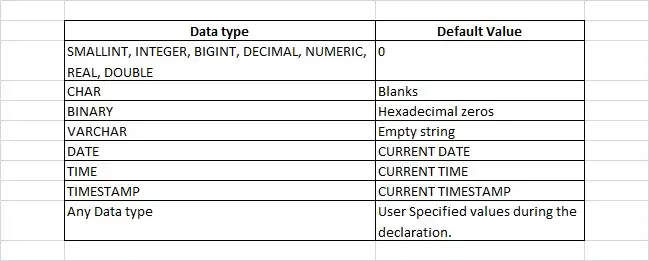
The WITH DEFAULT option allows us to specify a default value for a column when creating or altering a table.
This means that if no value is provided for this column when a row is inserted, DB2 will automatically assign the specified default value.
Examples -
1. Creating a Table with Default Values -
CREATE TABLE EMPLOYEE (
EMP_ID INTEGER NOT NULL,
EMP_NAME CHAR(50) DEFAULT,
DEPARTMENT CHAR(30) DEFAULT 'UNASSIGNED',
SALARY DECIMAL(10, 2) DEFAULT 30000.00,
JOIN_DATE DATE DEFAULT CURRENT DATE
);
- DEPARTMENT: Defaults to 'UNASSIGNED' if no department is specified.
- SALARY: Defaults to 30000.00 if no salary is provided.
- JOIN_DATE: Defaults to the current date if no joining date is specified.
2. Dropping the WITH DEFAULT Option - Removing a Default Value
ALTER TABLE EMPLOYEE
ALTER COLUMN DEPARTMENT DROP DEFAULT;
Removes the default value for the DEPARTMENT column, meaning it will no longer default to 'UNASSIGNED'.
3. Altering a column to Add/Change a default value -
ALTER TABLE EMPLOYEE
ALTER COLUMN SALARY SET DEFAULT 35000.00;
Changes the default salary value to 35000.00 for any new rows inserted without a specified salary.
The INSERT statement is an SQL statement used to add new rows of data to a table.
It is used to add one or multiple rows to a DB2 table.
The INSERT statement can be used to:
- Add individual rows of data.
- Add multiple rows in one command (using specific syntax).
- Set default values for unspecified columns if they have a default option.
Syntax -
INSERT INTO table_name (column1, column2, ...)
VALUES (value1, value2, ...);
Example -
INSERT INTO EMPLOYEE
	(EMP_ID, EMP_NAME, DEPARTMENT, SALARY, JOIN_DATE)
	VALUES (101, 'John Doe', 'SALES', 55000.00, '2024-01-01');
The above query insert a new employee record into the EMPLOYEE table with specific values for each column.
The UPDATE statement modifies data in one or more columns of existing rows in a DB2 table.
It can change specific column's values conditionally (to specific rows that match a condition) or unconditionally (to all rows in the table).
Syntax -
UPDATE table_name
SET column1 = value1, column2 = value2, ...
WHERE condition;
- WHERE: Optional clause specifying the conditions for updating only matching rows. If omitted, all rows in the table are updated.
Example -
UPDATE EMPLOYEE
SET SALARY = SALARY * 1.1
WHERE DEPARTMENT = 'SALES';
The above query update the salary of employees in the SALES department by 10%.
The DELETE statement is used to remove row(s) from a table and
is essential when we need to delete outdated or unwanted data or remove specific rows based on conditions.
We can specify which rows to delete using a WHERE clause or remove all rows if no conditions are provided.
Syntax -
DELETE FROM table_name
WHERE condition;
- WHERE: An optional clause that specifies conditions to limit the rows to be deleted. If omitted, all rows in the table are deleted.
Examples -
DELETE FROM EMPLOYEE
WHERE DEPARTMENT = 'SALES';
The above query delete all employees in the SALES department from the EMPLOYEE table.
The SELECT statement allows us to retrieve data from one or more tables in DB2 based on specific conditions.
This data can be used for viewing, reporting, or further processing within the application.
SELECT statements can be simple, retrieving all columns, or complex, using filtering, sorting, joins, and aggregation to obtain precisely the needed data.
Syntax -
SELECT * | column1, column2, ...
  FROM table_name
 WHERE condition
 GROUP BY column
HAVING condition
 ORDER BY column ASC | DESC;
- column1, column2, ...: Columns to retrieve from the table. Use
*to select all columns. - WHERE: Specifies conditions to filter the rows returned.
- GROUP BY: Groups rows that have the same values in specified columns.
- HAVING: Filters groups based on a specified condition.
- ORDER BY: Specifies the sort order of the result set (ascending or descending).
Example -
SELECT EMP_ID, EMP_NAME, SALARY
FROM EMPLOYEE
WHERE DEPARTMENT = 'SALES'
ORDER BY SALARY DESC;
The above query retrieves all employees in the SALES department and order them by their salary in descending order.
The JOIN statement is an SQL statement used to combine rows from two or more tables based on related columns.
By using JOINs, we can retrieve data across tables in a single query.
In COBOL programs, JOINs allow for consolidated data retrieval directly within the mainframe application.
Types of JOIN Statements -
- SQL INNER JOIN retrieves only rows that have matching values in both tables.
- SQL LEFT OUTER JOIN retrieves all rows from the left table, and matching rows from the right table. If there is no match, columns from the right table will show NULL.
- SQL RIGHT OUTER JOIN retrieves all rows from the right table, and matching rows from the left table. Columns from the left table will be NULL if there's no match.
- SQL OUTER JOIN retrieves all rows from both tables, and NULL is returned for columns that don't match in either table.
Syntax -
SELECT columns
FROM table1
JOIN_TYPE table2 ON table1.column = table2.column
WHERE condition;
- table1: The first table in the JOIN operation.
- table2: The second table in the JOIN operation.
- JOIN_TYPE: Specifies the type of join (INNER JOIN, LEFT JOIN, etc.).
- ON: Defines the join condition, linking related columns between tables.
- WHERE: An optional clause to filter rows further after joining.
Examples - Basic INNER JOIN Statement
SELECT EMPLOYEE.EMP_NAME,
       DEPARTMENT.DEPT_NAME
  FROM EMPLOYEE
       INNER JOIN DEPARTMENT
    ON EMPLOYEE.DEPT_ID = DEPARTMENT.DEPT_ID;
The above query retrieves only matching rows employee name and department name details from both tables.
The GRANT statement allows database administrators to assign specific permissions to users or groups,
enabling them to perform actions on database objects, such as tables or views.
Syntax -
GRANT privilege [, privilege ...]
ON object_type object_name
TO user_or_group [, user_or_group ...];
- privilege: Specifies the permission to be granted, such as SELECT, INSERT, UPDATE, or DELETE.
- object_type: The type of object (e.g., TABLE or VIEW) on which permissions are granted.
- object_name: The specific name of the object, such as the table name.
Examples -
GRANT SELECT, INSERT, UPDATE
ON TABLE EMPLOYEE
TO USER_A, USER_B;
In the above example, USER_A and USER_B are granted SELECT, INSERT, and UPDATE permissions on the EMPLOYEE table,
allowing them to view, add, and modify data in the table but not delete rows.
The REVOKE statement is used to remove or take back specific permissions from users or groups on database objects.
Permissions are often revoked when:
- A user’s role changes, and they no longer need access to certain data.
- Security policies require tighter control over data.
- There’s a need to limit or restrict access for data integrity or compliance purposes.
Syntax -
REVOKE privilege [, privilege ...]
ON object_type object_name
FROM user_or_group [, user_or_group ...];
Examples -
REVOKE SELECT, UPDATE
ON TABLE EMPLOYEE
FROM USER_A, USER_B;
In the above example, USER_A and USER_B lose their SELECT and UPDATE permissions on the EMPLOYEE table,
meaning they will no longer be able to view or modify data in this table.
The COMMIT statement is a transaction control statement used to finalize and apply changes,
such as inserts, updates, or deletions, to the database.
Once issued, these changes become permanent and visible to other users or applications accessing the database.
Without a COMMIT, changes remain in a temporary state and can be undone by issuing a ROLLBACK statement,
which reverts the database to its state before the transaction began.
Syntax -
COMMIT;
The COMMIT statement is generally issued at the end of a set of related SQL commands, ensuring that all modifications are saved.
The SYNCPOINT statement is used in mainframe environments,
particularly in transactional applications using CICS.
It functions similarly to a COMMIT statement but also manages transactions across multiple resources.
Syntax -
SYNCPOINT;
It commits changes across all resources in the transaction.
The ROLLBACK statement is used to cancel a transaction and revert any changes made during that transaction.
By issuing a ROLLBACK, all updates, inserts, and deletions made during the transaction are undone, preserving data integrity.
Situations where ROLLBACK is useful include:
- Program or system errors that interrupt a transaction.
- Incorrect data updates or modifications.
- User cancellation of a transaction.
Syntax -
ROLLBACK
The SYNCPOINT ROLLBACK command is used to undo changes across multiple resources, such as DB2 tables, VSAM files, or queues managed by CICS.