
DB2 Short Notes
Traditional File System -
A traditional file system refers to storing and managing data in the form of files on storage devices like disks, tapes, or hard drives. Types of traditional file systems in mainframes - sequential files (flat files), indexed files and hierarchical files.
What is DB2?
DB2 is a relational database management system (RDBMS) developed by IBM. It supports storing, retrieving, and managing data efficiently using SQL (Structured Query Language).
Differences between File System and Database -
| File System | Database |
|---|---|
| Understanding the data inside a file is easy only when it is mapped with the copybook layout. | Understanding the data inside a database is very easy since column names are present. |
| Accessing data is slow. | Accessing data is faster. |
| Accessing the same file parallelly is not possible. | Accessing data from the same table parallelly is possible. |
| Security is very low. | Security is very high. |
DB2 Catalog -
The DB2 Catalog is a metadata about the database that includes information about database objects, such as tables, indexes, views, columns, and users. Usage: The catalog is automatically updated whenever objects like tables or indexes are created or changed.
DB2 Directory -
The DB2 Directory is a set of internal system tables that store important information required by the DB2 database to operate. Usage: It helps DB2 manage SQL execution plans and optimizes access paths. Users typically don’t query it directly.
Buffer Pool -
A Buffer Pool is a portion of memory where frequently accessed data is temporarily stored for the faster access. Benefit: Reduces disk I/O operations and speeds up the database.
DB2 Logs -
DB2 uses logs to keep track of all database changes (such as inserts, updates, and deletes) to ensure data integrity and recovery. Usage:
- Active logs ensure the system can recover from crashes by replaying recent transactions.
- Archive logs are used for point-in-time recovery to restore the database to a specific moment.
Work File Database -
The Work File Database is a special database that stores temporary data during query processing. When a query is too large to be processed in memory or requires complex sorting or joins, DB2 uses the Work File Database to hold intermediate results temporarily.
A Storage Group is a set of disk volumes (storage devices) used to store database objects such as databases. Example: A storage group might have multiple disk volumes to store different table spaces for fast access.
A DB2 Database is a logical structure that helps organize and manage tablespaces, and other database objects. A database contains schemas (logical groups of objects) and table spaces (physical storage areas). Example: A company may have a "Finance" database for accounting records and a "HR" database for employee information.
A tablespace is a logical storage container (set of volumes) within a database used to store tables, indexes, and data. It help to define how data storage is allocated for database objects, managing disk space and enhancing access performance. A table space should have atleast one table and can have one or more tables. Example: It is like a folder on our computer where we store related files, ensuring efficient use of space and better performance.
Types of Tablespaces
- Simple Tablespace : Stores data in a straightforward manner without advanced features. Default tablespace.
- Segmented Tablespace : Divides the tablespace into segments (groups of pages), which each store data for a single table. Designed for tables with frequent insertions and deletions. Created by using SEGSIZE parameter.
- Partitioned Tablespace : Divides the tablespace into multiple partitions based on a defined key range (e.g., date or region). Ideal for large tables that need to be spread across multiple storage volumes, allowing for parallel processing. Created using NUMPARTS parameter.
- Universal Tablespace (UTS): Combines features of both segmented and partitioned tablespaces. Supports both segmented and partitioned characteristics. Created by using SEGSIZE and NUMPARTS parameters.
A table in DB2 is a two-dimensional structure consisting of rows and columns. It is a collection of rows (records) and columns (fields) to store related data. Tables are stored within tablespaces. It is like a spreadsheet: each row holds one record, and each column stores one type of information, such as a name, price, or date.
Row -
A Row is a horizontal entry in a table that represents a single record. Each row contains data for every column in that table, forming a complete entry or record. Example: A row in a customer table might contain a customer’s name, phone number, and address.
Column -
A Column in a table defines the type of data that will be stored in that part of the table. Each column stores only one type of data, such as text, numbers, or dates. Example: In an "Employee" table, columns might include "Employee ID," "Name," and "Hire Date".
Keys -
A key is a column or a set of columns that is used to uniquely identify each row in a table. Types:
- Primary Key: A column or a group of columns that uniquely identifies each row in a table. Only one primary key is allowed per table, and it cannot contain duplicate or null values.
- Foreign Key: A column or set of columns that creates a link between two tables by referencing the primary key of another table.
- Unique Key: Ensures that the values in a column are unique (no duplicates allowed), but it can contain null values.
- Composite Key: A key made up of multiple columns to uniquely identify a row.
A view is a virtual table that is defined by a SELECT query on one or more base tables. This query is stored in the database as a view, and when the view is accessed, DB2 executes the underlying query and presents the results as a table. Views do not store data themselves. Example: A view might display only customers' names and email addresses from a larger customer table.
Schemas and Schema Qualifiers -
A schema is a logical collection of database objects, such as tables, indexes, and views. The schema name acts as a prefix (qualifier) when accessing same objects within it.
Index Space -
An Index Space is where indexes are stored and it keep the index separate from the actual table data, allowing fast data retrieval without scanning the whole table.
An index works like a table of contents in a book—helping the system quickly find specific data. Each index is defined with one or more columns in a table and stored separately in the index space. Indexes store sorted values of specified columns, allowing DB2 to perform efficient lookups, sorting, and query processing. Example: An index on the "Employee ID" column allows quick retrieval of employee records based on ID.
Others -
Synonym -
A Synonym is an alternate name for a database object, such as a table or view. It provides an easy way to refer to objects, especially if their original names are long or complex.
Alias -
An Alias is a temporary name given to a table or view within a query. It makes queries easier to write and read, especially when dealing with multiple tables. Aliases exist only for the duration of the query execution.
Example:
SELECT e.name, d.dept_id FROM employees e, departments d WHERE e.dept_id = d.id;
Here, "e" and "d" are aliases for the Employees and Departments tables.
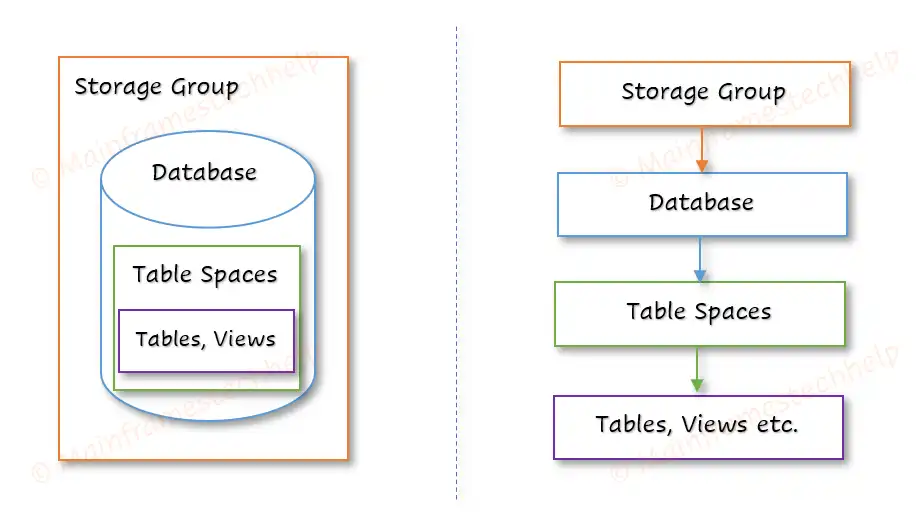
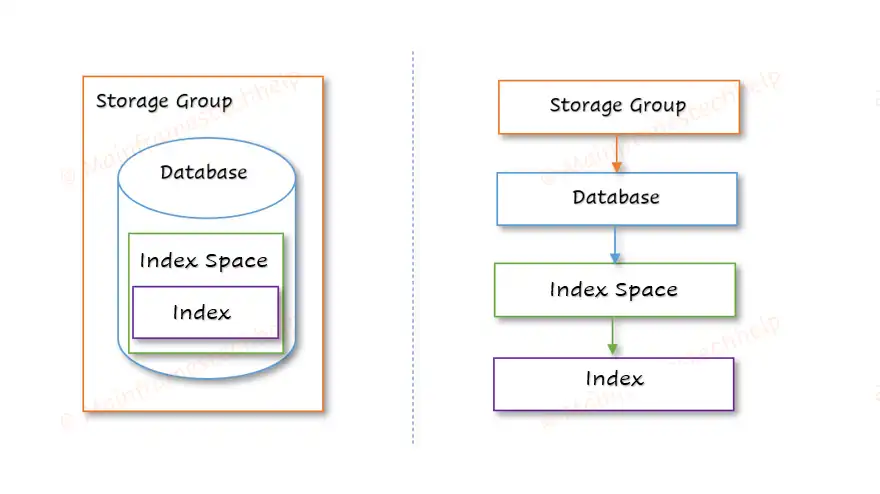
The DB2 storage structure defines how data is logically and physically organized to ensure efficient access and management. The hierarchy organizes data from Storage Groups (highest level) down to Rows and Columns (lowest level).
The two major types of storage structure in DB2 are -
- Table storage structure - organizes data logically and physically.
- Index storage structure - organizes index logically and physically for efficient storage and retrieval.
Data types define the type of data that can be stored in a table's column. DB2 supports a wide range of data types, grouped into categories such as numeric, string, date/time, and large objects (LOBs).
| Data Type | Description |
|---|---|
| INTEGER (INT) | Stores whole numbers (positive or negative) |
| SMALLINT | Stores smaller whole numbers, requiring less storage |
| BIGINT | Stores very large integers |
| DECIMAL (DEC) | Stores fixed-point numbers with precision |
| FLOAT/DOUBLE | Stores approximate floating-point numbers |
| CHAR (n) | Stores fixed-length text |
| VARCHAR (n) | Stores variable-length text |
| CLOB (Character Large Object) | Stores large text data (e.g., documents) |
| GRAPHIC / VARGRAPHIC | Stores fixed/variable-length graphic strings (e.g., for non-English characters) |
| DATE | Stores date in YYYY-MM-DD format |
| TIME | Stores time in HH:MM:SS format |
| TIMESTAMP | Stores date and time with fractional seconds |
| BLOB (Binary Large Object) | Stores large binary data (e.g., images) |
| CLOB (Character Large Object) | Stores large text data (e.g., documents) |
| DBCLOB (Double-Byte Character Large Object) | Stores double-byte character text (e.g., multi-language content) |
| BOOLEAN | Stores true/false values, often used for flags |
| XML | Used to store XML documents and data in XML format |
Data Integrity refers to the accuracy, consistency, and reliability of data stored in a database. In DB2, ensuring data integrity means that the data remains correct, unchanged (unless intended), and trustworthy throughout its lifecycle—whether during storage, processing, or retrieval.
Types -
DB2 supports four primary types of data integrity:
- Entity Integrity - ensures that every table row is uniquely identifiable by using a primary key.
- Referential Integrity - ensures that the relationships between tables remain valid by using foreign keys.
- Domain Integrity - ensures that values are valid and consistent by defining the acceptable range, format, or type of values for each column.
- User-Defined Integrity - involves custom business rules and logic that ensure the data meets specific business requirements.
Normalization is a systematic approach used in database design to organize data in a way that reduces redundancy and dependency by dividing large tables into smaller, more manageable ones.
Forms of Normalization -
Normalization is typically done in several steps, each corresponding to a specific normal form.
| Normalization | Description |
|---|---|
| First Normal Form (1NF) – Eliminate Repeating Groups | A table is in 1NF if it meets the following criteria:
|
| Second Normal Form (2NF) – Eliminate Partial Dependency | A table is in 2NF if:
|
| Third Normal Form (3NF) – Eliminate Transitive Dependency | A table is in 3NF if:
|
| Boyce-Codd Normal Form (BCNF) – Strengthened 3NF | A table is in BCNF if:
|
Isolation levels control how transaction data is isolated from other transactions, affecting the visibility and impact of changes made during a transaction.
Different Isolation Levels in DB2 -
| Isolation level | Description |
|---|---|
| Repeatable read (RR) | All rows referenced during the transaction are locked, preventing other transactions from updating or inserting rows that would affect the current transaction. |
| Read stability (RS) | Once a row is read, it is locked for the duration of the transaction, preventing other transactions from modifying it. |
| Cursor stability (CS) | The current row under a cursor is locked, preventing other transactions from changing it, but changes to other rows are visible. |
| Uncommitted read (UR) | Transactions can read data changes made by other transactions even before they are committed. |
In DB2, locks are mechanisms used to manage concurrent access to data in a database. They ensure data integrity and consistency by controlling how multiple users or processes interact with the data.
Locking Modes -
Shared Lock (S) -
- Used when a transaction only reads data (no updates).
- Multiple transactions can hold a shared lock on the same data simultaneously.
- Prevents other transactions from acquiring an exclusive lock on the same data.
Update Lock (U) -
- An intermediate lock between a shared lock and an exclusive lock.
- Used when a transaction first reads data (shared mode) and intends to update it later.
- Prevents deadlocks by avoiding two processes from waiting for each other to release a shared lock.
Exclusive Lock (X) -
- Used when a transaction updates or deletes data.
- No other transactions can read (shared lock) or update (exclusive lock) the data at the same time.
The SQL Communication Area (SQLCA) is a data structure used in DB2 programs (like COBOL) to capture the result and status (success, fail, or a warning) of SQL operations. The SQLCA should be included in a COBOL program like below:
EXEC SQL
	INCLUDE SQLCA
END-EXEC.
Key Fields of SQLCA and Their Uses -
| Field Name | Type | Description |
|---|---|---|
| SQLCODE | INTEGER | Return code indicating the result of the SQL operation.
|
| SQLERRM | CHAR(70) | This field stores a short error message related to the SQLCODE. |
| SQLERRD (Array) | INTEGER Array of 6 items | Contains DB2-specific diagnostic information. |
| SQLWARN (Array) | CHAR(1) of 11 items | Provides warning flags if the SQL operation completed with warnings. |
| SQLSTATE | CHAR(5) | Provides a standardized return code for SQL operations. |
Below is a step-by-step explanations to understand how to code SQL statements in a COBOL + DB2 program:
- Identify the DB2 Table and Columns.
- Include the SQLCA.
- Declare Host Variables in COBOL program.
- Write SQL Statements in COBOL.
- Handle Errors with SQLCODE and SQLSTATE.
- Compile, Bind, and Execute the COBOL + DB2 Program.
During precompilation, PRECOMPILER separates the SQL code from the COBOL code and stored in a DBRM (Database Request Module), while the COBOL code is modified for later compilation.
DSNHPC (utilities belongs to the DSNHPC family) is used for the precompilation of COBOL + DB2 program.
PRECOMPILER -
- It is responsible for checking the syntax errors of DB2 statements before placing them in DBRM.
- It generates timestamp tokens for both COBOL, which are validated while running the program.
The precompilation process -
If the program has DB2 statements, then we should add the precompiler step to the COBOL compilation JCL.
i.e., the Precompilation JCL = Precompile step + COBOL Compile JCL.
Sample Precompilation JCL -
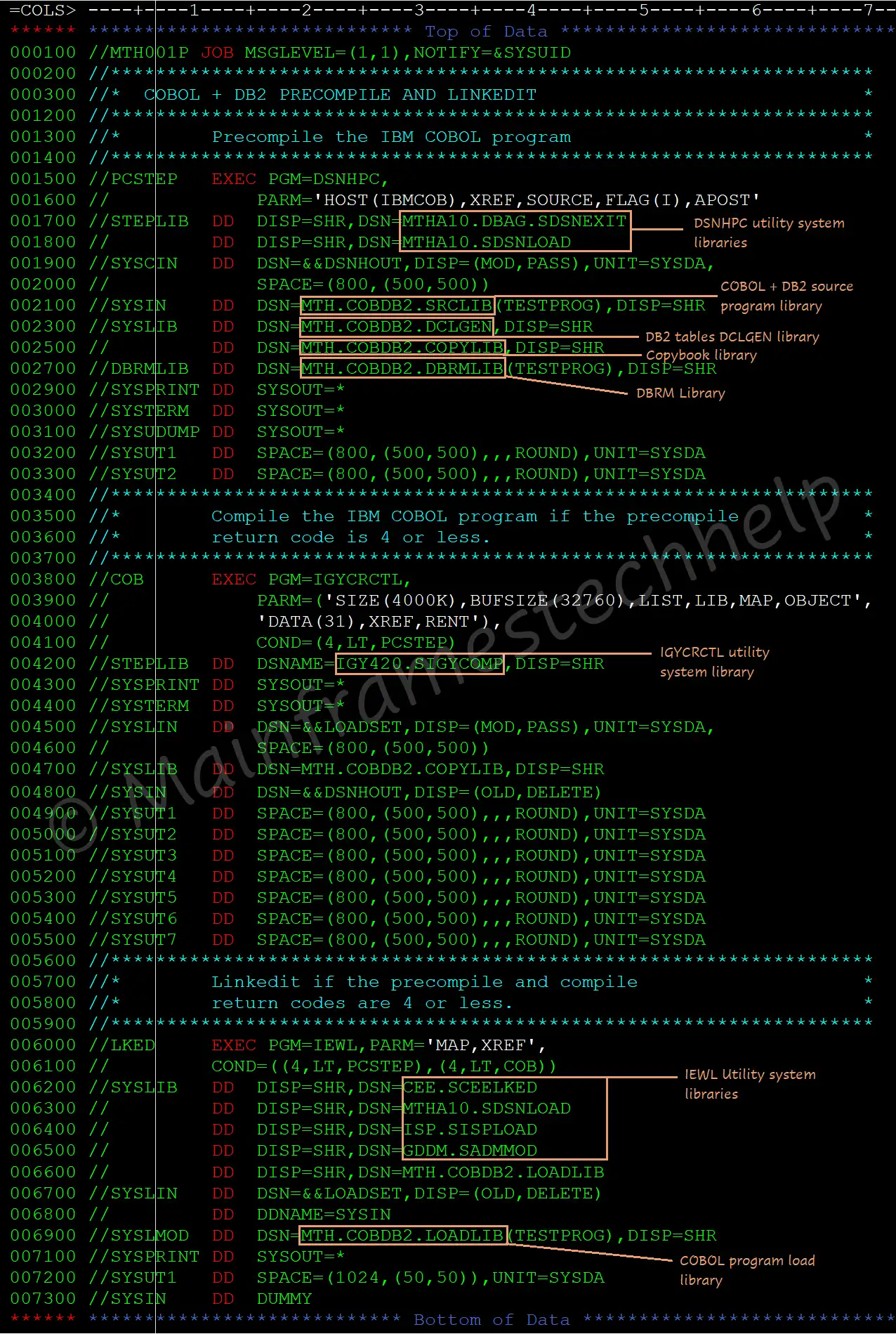
The bind process takes the DBRM and links it to a package or plan to establish the connection between an application program and its specific DB2 database. DB2 BIND process completes the below actions -
- Optimizes SQL statements & Validates SQL syntax.
- Validates authorization.
- Creates a package or plan.
A DBRM should bind to a plan or package before executing it. Each package/plan can contain one DBRM or multiple DBRMs. The plan is executable and the package is not executable.
IKJEFT01 utility is used to bind the DBRM to the plan or package.
Simple BIND JCL -
----+----1----+----2----+----3----+----4----+----5----+
//MTH001B JOB MSGLEVEL=(1,1),NOTIFY=&SYSUID
//*
//BIND     EXEC PGM=IKJEFT01
//STEPLIB  DD  DISP=SHR,DSN=MTHA10.DBAG.SDSNEXIT
//         DD  DISP=SHR,DSN=MTHA10.SDSNLOAD
//DBRMLIB  DD  DSN=MTH001.COBDB2.DBRMLIB,DISP=SHR
//SYSTSIN  DD  *
  DSN SYSTEM (system-name)
  BIND  PACKAGE (package-name) or PLAN (plan-name) -
        MEMBER    (program-name)      -
        ACTION    (action-options)    -
        ISOLATION (isolation-options) -
        VALIDATE  (validate-options)  -
        RELEASE   (release-options)   -
        EXPLAIN   (explain-options)   -
        OWNER     (owner-id)          -
        QUALIFIER (qualifier-name)    -
        ENCODING  (encoding-options)
  END
/*
...- BIND - is the process of finding the optimized access path to retrieve the data from the DB2 for the SQLs coded in the program.
- PACKAGE (package-name) - contains compiled and bound version of SQL statements. It is an intermediate component between the DBRM and PLAN.
- PLAN (plan-name) - is a collection of packages and used to execute the program.
- ACTION (action-options) - specifies whether the plan or package should be replaced or not. Options are - ADD, REPLACE.
- ISOLATION (isolation-options) - defines how far to isolate an application/application program from the effects of other running applications. Types are - CS, RR, RS, and UR.
- VALIDATE (validate-options) - determines the rechecking of BIND or REBIND errors while running the program.
- RELEASE (release-options) - used to decide when to release resources that are used by the program.
- EXPLAIN (explain-options) - obtains information about how SQL statements are executed in the package or plan.
- OWNER (owner-id) - specifies the owner-authorized ID of the plan or package.
- QUALIFIER (qualifier-name) - specifies the implicit qualifier for the tables, views, indexes, and aliases in the plan or package.
- LIB - is the library that specifies the PDS where the DBRMs are stored.
To execute COBOL + DB2 program, the program should successfully BIND first. We can run a DB2 program in the following ways:
- Batch Mode (JCL + COBOL/DB2 Programs)
- Online Mode (CICS + DB2 Programs)
Runtime Supervisor -
The runtime supervisor is responsible for validating the timestamps of COBOL and DB2 object codes. It checks the timestamp tokens of the object code of COBOL (T1) & timestamp from DBRM (T2) updated in DB2 plan or package at the time of running.
- If T1=T2, the program is ready for execution.
- If T1 not = T2, the program ABENDs with SQLCODE -818 (timestamp mismatch error).
Sample RUN JCL for COBOL + DB2 program -
//JOB-CARD
//STEP01 EXEC PGM=IKJEFT01
//SYSIN DD *
	RUN PROG (program-name) -
	PLAN (plan-name)        -
	LIB (prog-load-library)
/*- PROG (program-name) - Specifies the name of the compiled program.
- PLAN (plan-name) - Specifies the DB2 plan it is bound.
- LIB (prog-load-library) - Specifies the program load library where it resides.
DCLGEN (Declarations Generator) is a DB2 utility that automatically generates the COBOL host variable declarations eualent to table definition.
Process -
- Generate DCLGEN Output:
- COBOL host variable declarations for all the columns in a table.
- SQL table definition as part of the output.
- Include DCLGEN in a COBOL Program: Use EXEC SQL INCLUDE to pull the generated declarations into your COBOL program.
Host variables are COBOL variables used to store data exchanged between a COBOL program and the DB2 database. Host variables must be declared in the WORKING-STORAGE SECTION of the COBOL program.
Below are some common DB2 data types and their equivalent COBOL declarations:
| DB2 Data Type | COBOL Equivalent Declaration |
|---|---|
| INTEGER (INT) | PIC S9(9) COMP. or PIC 9(5). |
| SMALLINT | PIC S9(4) COMP. |
| BIGINT | PIC S9(18) COMP-3. |
| DECIMAL(p, s) | PIC 9(p-s)V9(s) COMP-3. |
| CHAR(n) | PIC X(n). |
| VARCHAR(n) | PIC X(n). |
| DATE | PIC X(10). |
| TIME | PIC X(8). |
| TIMESTAMP | PIC X(26). |
How Host Variables Are Used in COBOL + DB2 Programs -
- Declare Host Variables: Ensure that the COBOL variables declared in WORKING-STORAGE SECTION or include DCLGEN
- Use Colon (:) Prefix in SQL Statements: Reference host variables with :WS-VAR-NAME inside SQL.
A null indicator is a host variable in the COBOL program that indicates whether a column's value is null or not when fetching data from DB2. If the column value is null, DB2 sets the null indicator to -1 and skips assigning any value to the corresponding host variable.
If a column value is null and no null indicator is provided: SQLCODE -305 will be returned, indicating that a null value was encountered, but no null indicator was declared.
Example: How to Declare and Use a Null Indicator in COBOL
The null indicator is typically declared in the WORKING-STORAGE SECTION or in the DCLGEN as a 2-byte integer like below -
...
   05 EMP-NAME      PIC X(50). * Host variable for Employee Name
   05 EMP-NAME-NI   PIC S9(4) COMP. * Null indicator for Employee Name
   ...
Declaration of null indicator for a column immediately follows the host variable declaration for the same column name.
- Host Variable (WS-EMP-NAME): Stores the actual data (if not null).
- Null Indicator (WS-NAME-NULL-IND): Stores the status of the column value. The valid status of the null indicator are -
- 0: Column has a non-null value (valid data).
- -1: Column has a null value (missing data).
- -2: Column has a value that is more in size thn host variable (truncated data).
The INSERT statement is used to add new rows of data to a table.
It is used to add one or multiple rows to a DB2 table.
Using INSERT Statements in a COBOL Program
In a COBOL + DB2 program, the INSERT statement can be embedded using the EXEC SQL ... END-EXEC syntax.
Host variables, declared in COBOL, are used to hold the values that will be inserted into the DB2 table.
Example - Embedding an INSERT Statement in COBOL
...
EXEC SQL
	INSERT INTO EMPLOYEE
	 (EMP_ID, EMP_NAME, DEPARTMENT, SALARY, JOIN_DATE)
	VALUES
	(:EMP-ID, :EMP-NAME, :DEPARTMENT, :SALARY, :JOIN-DATE)
END-EXEC.

IF SQLCODE = -803
	DISPLAY 'Error: Duplicate key detected'
ELSE
	IF SQLCODE < 0
		DISPLAY 'SQL Error: ' SQLCODE
	END IF
END-IF.
...- SQLCODE = -803: Indicates a duplicate key error, meaning a unique constraint violation.
- SQLCODE < 0: Catches other SQL errors.
STOP RUNterminates the program for severe errors.
The UPDATE statement modifies data in one or more columns of existing rows in a DB2 table.
It can change specific column's values conditionally (to specific rows that match a condition) or unconditionally (to all rows in the table).
Using UPDATE Statements in a COBOL Program
In a COBOL + DB2 program, the UPDATE statement is embedded using EXEC SQL ... END-EXEC.
COBOL host variables are used to pass values dynamically to the SQL statement, allowing data updates within the program's flow.
Example - Embedding an UPDATE Statement in COBOL
...
EXEC SQL
	UPDATE EMPLOYEE
	SET SALARY = :NEW-SALARY
	WHERE EMP_ID = :EMP-ID
END-EXEC.

IF SQLCODE = 100
	DISPLAY 'No matching data found for the update'
ELSE
	IF SQLCODE < 0
		DISPLAY 'SQL Error: ' SQLCODE
	END-IF
END-IF.
...- SQLCODE = 100: Indicates that no rows met the
WHEREcondition, so no rows were updated. - SQLCODE < 0: Handles other SQL errors, displaying the
SQLCODEfor troubleshooting.
The DELETE statement is used to remove row(s) from a table and
is essential when we need to delete outdated or unwanted data or remove specific rows based on conditions.
Using DELETE Statements in a COBOL Program -
In a COBOL + DB2 program, the DELETE statement is embedded using EXEC SQL ... END-EXEC.
Host variables, which are COBOL variables, can be used to dynamically specify values in the DELETE statement.
Example - Embedding a DELETE Statement in COBOL
...
EXEC SQL
	DELETE FROM EMPLOYEE
	WHERE EMP_ID = :EMP-ID
END-EXEC.

IF SQLCODE = 100
	DISPLAY 'No matching data found for deletion'
ELSE
	IF SQLCODE < 0
		DISPLAY 'SQL Error: ' SQLCODE
	END-IF
END-IF.
...- SQLCODE = 100: Indicates that no rows met the
WHEREcondition, so no rows were deleted. - SQLCODE < 0: Catches other SQL errors and displays the
SQLCODEfor troubleshooting.
The SELECT statement allows us to retrieve data from one or more tables in DB2 based on specific conditions.
Using SELECT Statements in a COBOL Program
In a COBOL + DB2 program, SELECT statements are embedded within the code using EXEC SQL ... END-EXEC syntax.
The retrieved data can then be stored in host variables, which are COBOL variables that hold data fetched by the SELECT statement.
...
EXEC SQL
	SELECT EMP_ID, EMP_NAME, SALARY
	INTO :EMP-ID, :EMP-NAME, :SALARY
	FROM EMPLOYEE
	WHERE DEPARTMENT = 'SALES'
END-EXEC.

IF SQLCODE = 100
	DISPLAY 'No matching data found'
ELSE
	IF SQLCODE < 0
		DISPLAY 'SQL Error: ' SQLCODE
	END-IF
END-IF.
...- SQLCODE = 100: Indicates no matching data was found.
- SQLCODE < 0: Catches other SQL errors.
STOP RUNterminates the program for severe errors.
The JOIN statement is an SQL statement used to combine rows from two or more tables based on related columns.
By using JOINs, we can retrieve data across multiple tables in a single query.
Types of JOIN Statements -
- SQL INNER JOIN retrieves only rows that have matching values in both tables.
- SQL LEFT OUTER JOIN retrieves all rows from the left table, and matching rows from the right table. If there is no match, columns from the right table will show NULL.
- SQL RIGHT OUTER JOIN retrieves all rows from the right table, and matching rows from the left table. Columns from the left table will be NULL if there's no match.
- SQL OUTER JOIN retrieves all rows from both tables, and NULL is returned for columns that don't match in either table.
Using JOIN Statements in a COBOL Program
In COBOL programs with embedded SQL (DB2), the JOIN statement is written inside EXEC SQL ... END-EXEC.
The query result is stored in host variables defined in COBOL.
...
EXEC SQL
	SELECT EMPLOYEE.EMP_NAME, DEPARTMENT.DEPT_NAME
	  INTO :EMP-NAME, :DEPT-NAME
	  FROM EMPLOYEE
		   INNER JOIN DEPARTMENT
		ON EMPLOYEE.DEPT_ID = DEPARTMENT.DEPT_ID
END-EXEC.

IF SQLCODE = 100
	DISPLAY 'No matching data found for the join'
ELSE
	IF SQLCODE < 0
		DISPLAY 'SQL Error: ' SQLCODE
	END-IF
END-IF.
...- SQLCODE = 100: Indicates no rows matched the JOIN condition.
- SQLCODE < 0: Catches other SQL errors, displaying the
SQLCODEfor troubleshooting.
A cursor is a database object that acts as a pointer to the result set of a query. This allows applications to loop through the result set and perform specific actions for each row one at a time.
Cursor Lifecycle
A cursor in DB2 goes through the following sequence:
- DB2 DECLARE CURSOR
Defines the cursor with a
SELECTstatement specifying the columns and conditions for rows to be fetched.EXEC SQL DECLARE C1 CURSOR FOR SELECT query.. END-EXEC.
- DB2 OPEN Cursor
Open the cursor to start accessing the result set.
EXEC SQL
	OPEN C1
END-EXEC.
- DB2 FETCH Cursor
Retrieve rows one by one, storing values in COBOL host variables.
EXEC SQL
	FETCH C1 INTO :host-variables
END-EXEC.
- DB2 CLOSE Cursor
Close the cursor after processing all required rows to free resources.
EXEC SQL
	CLOSE C1
END-EXEC.
| Cursor | Decription |
|---|---|
| Read Only Cursor | The Read-Only cursor performs only read operations on the table or result table.
FOR FETCH ONLY option used to declare Read-Only Cursors. |
| Updatable Cursor | The updatable cursor is used to perform updates on the columns in the retrieved row(s).
Positioned UPDATE and positioned DELETE (FOR UPDATE OF clause) are allowed. |
| Cursor for UPDATE | The cursor for the update is used to perform updates to the columns in the table retrieved row(s).
Positioned UPDATE is allowed in the cursor for the update. |
| Cursor for DELETE | The cursor for DELETE is used to delete the rows from the table.
Positioned DELETE is allowed in the cursor for DELETE. |
| Non-scrollable Cursor / Serial Cursor | The non-scrollable cursor processes the row(s) one by one from the table or result table beginning.
NO SCROLL keyword used to specify the cursor is non-scrollable. |
| Scrollable Cursor | The scrollable cursor fetches row(s) as many times as required from the result table.
The cursor moved through the result table using the position specified on the FETCH statement. |
| Sensitive Scrollable Cursor | After generating the result table, the cursor is sensitive to insert, update, or delete operations performed on the database table.
For example, when the positioned UPDATE or DELETE is performed using the cursor, the changes are immediately visible in the result table. |
| Insensitive Scrollable Cursor | The cursor is not sensitive to insert, update, or delete operations performed on the database table after generating the result table.
If INSENSITIVE is specified, the cursor is read-only. |
| Cursor With Hold | WITH HOLD prevents the cursor from closing when the COMMIT operation is executed before the CLOSE CURSOR.
If WITH HOLD option specifies, COMMIT only commits the current unit of work. |
| Cursor Without Hold | The cursor can be closed if any COMMIT operation is performed before the CLOSE CURSOR.
If theWITH HOLD option is not specified, this is the default. |
| Sensitive Static Scrollable Cursor | Sensitive static scroll cursor is the cursor that is sensitive to UPDATE or DELETE operations performed on the database table after generating the result table. i.e., after opening the cursor. |
| Sensitive Dynamic Scrollable Cursor | Sensitive dynamic scroll cursor is the cursor that is sensitive to INSERT, UPDATE, or DELETE operations performed on the database table after generating the result table. i.e., after opening the cursor. |
The COMMIT statement is a transaction control statement used to finalize and apply changes,
such as inserts, updates, or deletions, to the database.
Once issued, these changes become permanent and visible to other users or applications accessing the database.
Without a COMMIT, changes remain in a temporary state and can be undone by issuing a ROLLBACK statement,
which reverts the database to its state before the transaction began.
Using COMMIT Statements in a COBOL Program
In a COBOL-DB2 program, the COMMIT statement is embedded within an EXEC SQL block.
Example - Steps to Code an COMMIT Statement in a COBOL Program
   *Update Data in the Employee Table
	   EXEC SQL
		   UPDATE EMPLOYEE
		   SET SALARY = SALARY + 1000
		   WHERE JOB = 'MANAGER'
	   END-EXEC.
	   ...

   * Step 2: Commit the Transaction to Save Changes
	   EXEC SQL
		   COMMIT
	   END-EXEC.
	   ...
	   STOP RUN.
The SYNCPOINT statement is used in mainframe environments,
particularly in transactional applications using CICS.
It functions similarly to a COMMIT statement but also manages transactions across multiple resources.
Using SYNCPOINT Statement in a COBOL Program
In a COBOL-CICS program, SYNCPOINT is used after completing all operations to be committed.
Executing SYNCPOINT finalizes changes across resources, ensuring data consistency.
Example - SYNCPOINT Statement in a COBOL-CICS Program
   *Update Data in DB2 Table
	   EXEC SQL
		   UPDATE EMPLOYEE
		   SET SALARY = SALARY + 1000
		   WHERE JOB = 'MANAGER'
	   END-EXEC.
	   ...

   * Step 2: Write Data to VSAM File
	   EXEC CICS WRITE FILE('VSAMFILE')
		   FROM(WS-DATA-RECORD)
		   RESP(EIBRESP)
	   END-EXEC.
	   ...

   * Step 3: Commit Transaction Across Resources
	   EXEC CICS SYNCPOINT END-EXEC.
By issuing a ROLLBACK, all updates, inserts, and deletions made during the transaction are undone, preserving data integrity.
Situations where ROLLBACK is useful include:
- Program or system errors that interrupt a transaction.
- Incorrect data updates or modifications.
- User cancellation of a transaction.
Using ROLLBACK Statement in a COBOL Program
In a COBOL-DB2 program, ROLLBACK is used after a series of SQL operations if an error occurs that requires undoing changes.
It is issued through an EXEC SQL block and is commonly found within error-handling sections of programs.
Example - ROLLBACK Statement in a COBOL Program
   * Attempt to Update Data in DB2 Table
	   EXEC SQL
		   UPDATE EMPLOYEE
		   SET SALARY = SALARY + 1000
		   WHERE JOB = 'MANAGER'
	   END-EXEC.
		...

		* Step 2: Rollback Transaction
		EXEC SQL
			ROLLBACK
		END-EXEC.
		...
SQLCODE will return the SQL return code for the query provided but not for the condition provided. Error code can be handled in the program by using SQLCODE validation after each query executed. Most of very frequent error codes described below:
- The SQLCODE is equal to 000, the query executed successfully.
- If the SQLCODE is positive, Then the Query executed with Warning.
- If the SQLCODE is negative, then the Query returns errors.
| SQLCODE | Description |
|---|---|
| 000 | Success |
| +100 | End of the ROWS fetched in cursor
Rows not found in the table to select which satisfies the condition. Rows not found in the table to UPDATE/DELETE in the table which satisfies the condition. |
| -180 | Date format error (MM:DD:YYYY) – i.e. the Date using for the Move/to compare is different from target date format. Date was not moved to the target field which is required to. |
| -181 | Date internal values (MM>12, DD>31) Date and Month values are exceeds its maximum. |
| -305 | Null values exception. The cursor fetches returning the null values which was not handled with NULL indicator. The SELECT query retrieving NULL values which are not handled with NULL indicator. The UPDATE/INSERT trying to insert/update NULL values without handling it through NULL indicator. |
| -310 | Missing decimal values. This will happen when any Numeric host variable is used to update the column which is having the decimal equalent column. |
| -313 | Mismatch between number of host variables & number of columns selected. Mismatch between the number of host variables & numbers of columns selected in SELECT query or FETCH cursor. |
| -502 | Cursor not opened. The program tries to fetch the data for a particular cursor which is not opened. |
| -503 | Cursor already opened. The program tries to open the cursor which is already opened. |
| -532 | Foreign key violation. |
| -803 | Duplicate records. Program tries to insert the rows which s already existed with the same key. Program tries to update the existing row which is equalent to the key that is already existed in the table. |
| -805 | Plan not found / resource not available. Program tries to call the program which the plan got corrupted or the plan got deleted. |
| -811 | cursor not defined/select trying to retrieve multiple records. Normal select statement in the program retrieving more than one row from the table which needs a cursor declaration. |
| -818 | Timestamp mismatches error. As we discussed in the BIND process, if the timestamp mismatched during the compilation, the above error will be thrown when calling the particular modules which didn’t binded properly. |
| -904 | Resource not available. |
| -911 | DEAD LOCK with timeout. |
| -913 | DEAD LOCK with roll back. |
| -922 | Authorization failure. |